

Every time you log into a website, add something to a shopping cart, or stay signed in while browsing, a session cookie is almost certainly doing the work behind the scenes. They are one of the most fundamental pieces of how the web works—acting as a temporary memory for the browser—yet most people have no idea they exist.
A session cookie is a small piece of data stored in your browser that helps a website remember who you are during a single browsing session. It is created when you visit a site and deleted automatically when you close your browser tab or window. Unlike persistent cookies, session cookies are not stored on your hard drive between visits – they exist only in your browser’s memory while the session is active.
Cookies in One Paragraph: The Necessary Context
HTTP – the protocol your browser uses to talk to websites – is stateless, meaning each request your browser sends is treated as completely independent. Cookies solve this problem by giving the browser a small piece of information to include with each request, allowing the server to recognise that you are the same person who made the last request. Without cookies, you would have to log in again on every single page load. Session cookies are the most temporary form of this mechanism.
Session Cookie vs. Persistent Cookie: Key Differences
| Property | Session Cookie | Persistent Cookie |
|---|---|---|
| Lifespan | Until browser tab/window is closed | Has a set expiry date – survives browser restarts |
| Stored on disk? | No – memory only | Yes – written to disk |
| Survives browser restart? | No | Yes (until expiry) |
| Typical use | Login state, shopping cart, form tracking | Preferences, ‘remember me’, analytics tracking |
| Privacy risk | Lower – data disappears when you close browser | Higher – persists and can be read later |
| Created by | Server sending Set-Cookie header without Expires | Server sending Set-Cookie with Expires or Max-Age |
How Session Cookies Work: Step by Step
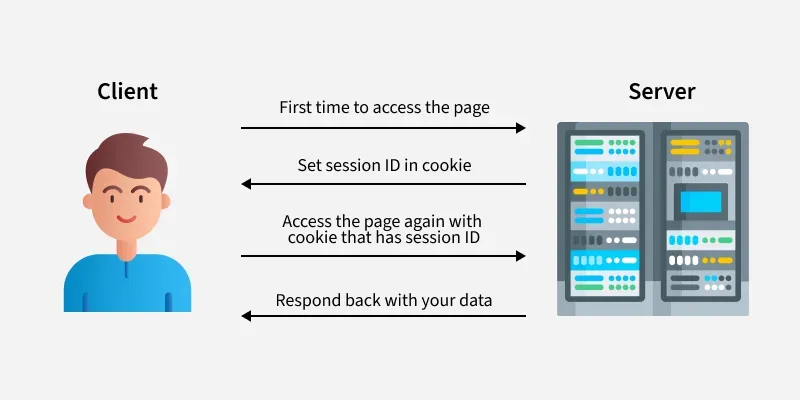
- Step 1 – You visit a website. Your browser sends an HTTP request to the server.
- Step 2 – The server creates a session on its end and generates a unique session ID (a random string like ‘abc123xyz’).
- Step 3 – The server sends back an HTTP response that includes a Set-Cookie header: Set-Cookie: sessionid=abc123xyz
- Step 4 – Your browser stores this session cookie in memory and includes it in every subsequent request to that domain: Cookie: sessionid=abc123xyz
- Step 5 – The server receives your request, reads the session ID, looks it up in its session store, and knows which user you are – without you having to re-authenticate on every page.
- Step 6 – When you close your browser tab, the cookie is deleted. The server’s session eventually expires on its end too (typically after 20-30 minutes of inactivity, or when you explicitly log out).
What Information Do Session Cookies Actually Store?
Very little, actually – and that is by design. A session cookie typically stores only a session ID: a random, unique identifier that has no meaning on its own. The actual data (who you are, what is in your cart, your permissions) lives on the server, keyed to that session ID.
- What is in the cookie: sessionid=4f8a9b2c1d3e (a random token – not your name, address, or password)
- What is on the server: { sessionid: ‘4f8a9b2c1d3e’, user: ‘jane@email.com’, cart: [item1, item2], loginTime: ‘…’ }
- This separation is deliberate – it means even if someone intercepted your cookie, all they get is a token, not your actual data
Are Session Cookies Safe?
Generally yes – with caveats. Because session cookies store only a token and expire when you close your browser, they are significantly safer than persistent tracking cookies. However, they are not without risk:
- Session hijacking: if an attacker can steal your session cookie (via an insecure connection or XSS attack), they can impersonate you for the duration of that session – this is why HTTPS matters
- HttpOnly flag: well-configured sites set session cookies as HttpOnly, meaning JavaScript cannot access them – this prevents most XSS-based cookie theft
- Secure flag: session cookies should also be marked Secure, meaning they are only sent over HTTPS connections – never over plain HTTP
- SameSite attribute: modern session cookies use SameSite=Strict or Lax to prevent cross-site request forgery (CSRF) attacks
Session Cookies and Privacy Law (GDPR, ePrivacy)
This is where it gets nuanced. Under GDPR and the EU ePrivacy Directive, cookies that are ‘strictly necessary’ for the website to function do not require user consent. Session cookies used purely to maintain login state or shopping cart data are generally considered strictly necessary – which is why those cookie consent banners usually have a note saying ‘some cookies are required and cannot be disabled.’
However, if a session cookie is used for tracking user behaviour beyond what is strictly necessary to deliver the service, it may require consent. The line is not always clear, and regulators have taken different positions in different cases.
How to View and Delete Session Cookies by Browser
| Browser | How to View Cookies | How to Delete Session Cookies |
|---|---|---|
| Chrome | DevTools (F12) → Application → Cookies | DevTools → right-click cookie → Delete, or Settings → Privacy → Clear browsing data |
| Firefox | DevTools (F12) → Storage → Cookies | DevTools → right-click → Delete, or Settings → Privacy → Clear Data |
| Safari | Develop menu → Show Web Inspector → Storage | Preferences → Privacy → Manage Website Data |
| Edge | DevTools (F12) → Application → Cookies | Settings → Privacy → Clear browsing data |
| Brave | DevTools (F12) → Application → Cookies | Settings → Privacy → Clear browsing data |
Common Misconceptions
- ‘Session cookies track me across websites’ – False. Session cookies are domain-specific. A session cookie from site A cannot be read by site B.
- ‘Deleting cookies logs me out of everything’ – Partially true. Deleting session cookies will log you out of sites where your login was maintained by a session cookie. Sites using persistent ‘remember me’ cookies may keep you logged in.
- ‘Session cookies are the same as third-party tracking cookies’ – False. Third-party tracking cookies are persistent, set by advertising networks, and specifically designed for cross-site tracking. Session cookies are first-party and temporary.
- ‘Incognito mode means no cookies’ – Not exactly. Incognito mode still uses session cookies – it just deletes all of them when you close the incognito window, treating every session as if the browser was closed.
Final Takeaway
Session cookies are one of the invisible mechanisms that make the modern web functional. Without them, every page load would require re-authentication. They are temporary by design, store minimal data by design, and are significantly less privacy-invasive than the persistent tracking cookies that rightly get more attention.
Understanding the difference between session and persistent cookies helps you make smarter decisions about browser settings, cookie consent choices, and what to clear when you care about privacy – without unnecessarily breaking website functionality.
